

Wumpus running up a Developer-themed staircase in pursuit of a coin.
Engineering & Developers

Cost Attribution in Discord’s API

Discord's API is powered by a unified Python codebase containing over 1700 API endpoints and around 700 background tasks. Engineers make changes to this shared code every day as it's continuously deployed to several hundred separate Kubernetes deployments through a phased rollout process.

That is a lot of code, engineers, endpoints, and deployments! It can be challenging to keep track of all of the changes made every single day, but we have good instrumentation that allows us to keep an eye on latency, throughput, and error rates to help detect regressions that may negatively impact users or our systems.

One observability gap that we wanted to improve last year was our understanding of how hosting costs were allocated across product features. For example, how much does it cost to operate the parts of API that are used to send and receive messages? Start a stream? Send a friend a Nitro gift? How do these values change over time? Did that change someone landed last week meaningfully affect a team’s spend on hosting? We’d like to know these answers for both a single endpoint (e.g. sending a message in a text channel) and for an entire feature (e.g. chat - more on these later).

Most cloud providers will happily split out your costs by Kubernetes deployment, which is helpful but is only the first step due to how we deploy the API. We run the same codebase in all of our Kubernetes deployments, each of which handles a specific subset of HTTP traffic or background tasks. Since we already have so many deployments, breaking them up further to facilitate cost tracking isn’t tenable. We needed to find a way to add better tracking to our existing system without changing our deployment topology.

An additional challenge is that each API worker process handles multiple tasks concurrently. At any moment, it will be juggling work related to any number of features (we do isolate certain traffic to particular deployments, but not in a way that helps us here). Ultimately, in order to understand the cost of serving the API traffic related to a given feature, we need to be able to allocate the cost for a deployment based on how much time it spent on code related to that feature. By extending our application’s profiling tooling, we were able to do exactly this.

Note: all numbers and code in this post are for illustrative purposes only.
Setting the stage, featuring: Features!

Before we get into inspecting our Python interpreter, let’s set the scene and spend a little time on how features are expressed within Discord’s codebase.

The engineering team put together a list of feature groups that cluster our API endpoints and background tasks by related functionality. An example of one such feature group is chat, which includes the functionality required for sending, viewing, and editing messages in multiple contexts. This categorization system doesn’t attempt to accurately represent all product features, as its goal is to provide an abstraction that is useful for cost and reliability tracking for subsets of the API.

Below are a few of the formal feature definitions that make up the chat feature group within our codebase:

- feature: messaging
  team: msgs-team
  tier: S
  feature_group: chat
- feature: text-in-voice
  team: msgs-team
  tier: B
  feature_group: chat
- feature: typing-indicator
  team: msgs-team
  tier: E
  feature_group: chat

Each feature has a name, an owning team, a tier, and a feature group. The tier represents how critical the feature group’s functionality is to the healthy operation of Discord. We use these priority values to define and enforce SLOs for endpoints and background tasks.

All features and feature groups are defined in code, and we generate language-specific versions of the data for use across services.

We assign every API endpoint and background task to a feature (and through that, a feature group) by extending our existing Python declarations for these endpoints and tasks. For example:

@route(
    'POST',
    '/channels/<channel_id>/messages',
    feature=Feature.MESSAGING,
    # ...
)
def create_message(channel_id: int) -> MessageResponse:
     ...

When the API begins to process an HTTP request, it’ll look up the feature and tier for that request and set them in a ContextVar for easy access during processing.

What does a deployment cost?

We currently run all of our API deployments in Kubernetes. Most cloud providers make it simple to see what you’re paying for a given Kubernetes cluster. You will usually be able to get data that shows what you’re paying for a given hour, broken down by SKUs for VM instances, disks, etc. A single row of that data might look something like this (these examples have been simplified):

{
    "sku": "sku-vm-instance-large",
    "description": "VM instance, hourly",
    "resource": "production-cluster-1",
    "usage_start_time": "2026-04-01 01:00:00 UTC",
    "usage_end_time": "2026-04-01 02:00:00 UTC",
    "quantity": 18,
    "cost_per": 1.536,
    "total_cost": 27.648
}

The specifics will vary based on your provider, but the main thing to notice is that this is showing the cost for:

  • a specific SKU (VMs, disk, network, etc.)
  • over a given hour
  • for an entire Kubernetes cluster (”resource” in this example)

That’s not granular enough for our purposes, since we need to know the costs per deployment. Fortunately, most Kubernetes cloud providers will expose more detailed billing information that does exactly this. On Google’s GKE you need to enable cost allocation and use the detailed billing report, on Amazon’s EKS you’ll need to use split cost allocation, etc. Once you’ve done this, you will be able to have data that is instead broken down by Kubernetes deployment or pod (depending on your configuration), giving you something like this:

{
    "sku": "sku-vm-instance-large",
    "description": "VM instance, hourly",
    "resource": "production-cluster-1",
    "usage_start_time": "2026-04-01 01:00:00 UTC",
    "usage_end_time": "2026-04-01 02:00:00 UTC",
    "quantity": 9,
    "cost_per": 1.536,
    "total_cost": 13.824,
    "k8s_deployment": "messages-production"
}

This shows the same charges as before, but now broken out and tagged by Kubernetes deployment. Now that we have costs per deployment, we can dig into how to divide those costs based on what work the deployment did during a given time period.

It’s worth mentioning that you can often have costs broken down by custom Kubernetes labels, so for a simpler setup (like where a team owns an entire service), that can be enough to assign costs to owners. For us, though, we need to break the cost of each deployment up into lots of smaller parts, so we’ll need to go deeper.

Finding an accurate cost per endpoint

Each of our API HTTP deployments processes requests for a subset of our endpoints. So how do we determine how to break down the cost of a deployment by feature?

We could start by assuming a uniform (resource) cost per request, and divide the monetary cost of a deployment evenly based on the number of requests received in a given time window, grouped by endpoint. That value can then be multiplied by the number of requests for a given feature to determine its cost.

# an inexact approach
cost_per_request = deployment_cost / deployment_request_count
endpoint_cost = endpoint_request_count * cost_per_request

But we know not all endpoints are equal in terms of resource use (sending a message is more work than marking one unread), and of course, even a given endpoint can perform differently based on its arguments (accidentally mentioning @everyone in a server with 200k members is more work than DM’ing with your friend). We really want to be able to compare endpoints to each other (and to see changes to an individual endpoint over time), and to do that, we need a better way to measure the work done on behalf of a request.

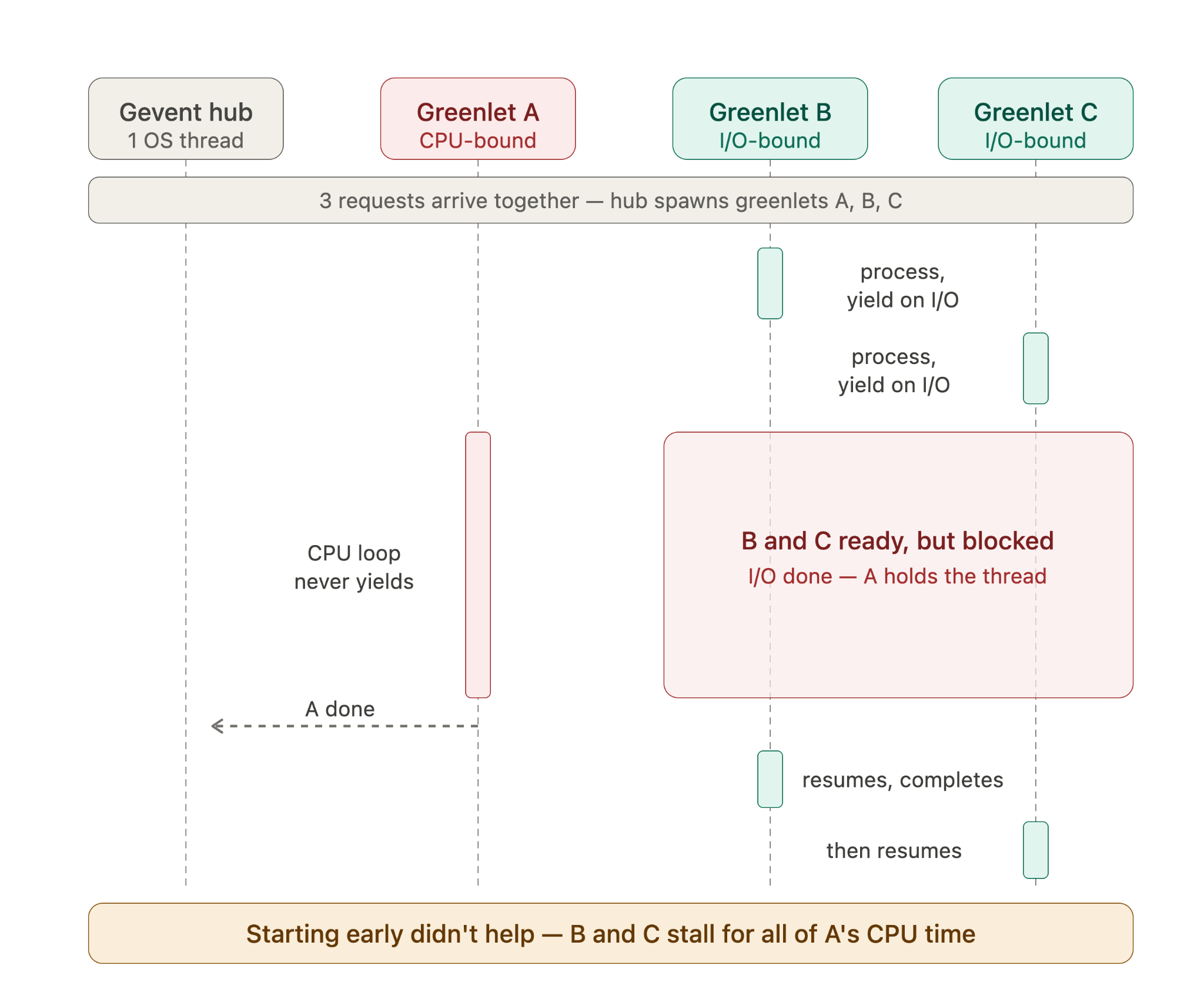
Another option would be to use request latency as a proxy for how much time is spent on a request. Because surely, a longer request equals more time spent on the request, right? Unfortunately, the duration of most requests is dominated by waiting on calls to downstream services, meaning it isn’t a very good measure of how much CPU time is actively dedicated to a request.

Additionally, we use a coroutine-based concurrency model (or ”green” threads) that allows us to process multiple http requests at once. We greatly increase the throughput of our workers by being able to pause processing a request that is waiting on a downstream service call and giving control to another pending request. However, the downside to this model is that one request doing CPU-bound work can delay the processing of other requests.

Sequence diagram showing three greenlets (A, B, and C) processing requests concurrently. Greenlets A and B perform IO and yield to greenlet C, which performs a CPU-intensive task that delays processing of the other greenlets.

With this approach, endpoints can be charged for time they weren’t even running, like you being on the hook for a speeding ticket while your friend was driving.

Ultimately, we need to measure how much time a CPU core spent doing some work. And we already had a way to do this, although it had nothing to do with features or endpoints.

Profiling to the rescue

Profiling is a standard part of our toolset, and understanding what code a Python process was spending time running is something we look at often as we try to understand why the performance profile of an endpoint has changed.

The gevent concurrency model mentioned earlier makes it slightly trickier to know what Python is doing at any given time. Our API processes have a sampling profiler that checks the call stack at regular intervals to see what code is running and records this data to an in-memory buffer. A hypothetical simplified version of that code might look something like this:

def fold_stack(frame: Optional[types.FrameType]) -> str:
    """Collapse a frame chain into Pyroscope's "folded" format.

    `frame` is the innermost (currently executing) frame. We walk *up* the
    `f_back` chain to the program's entry point, then join the frames
    root-first with ';' — e.g. ``main;handle;parse``. Pyroscope treats this
    string as a unique key, so two samples with the same call path collapse
    onto the same line and their counts add up.
    """
    frames: List[str] = []
    while frame is not None:
        module = frame.f_globals.get('__name__', '?')
        func = frame.f_code.co_name
        frames.append(f'{module}.{func}')
        frame = frame.f_back

    # Reverse so the outermost caller (the root) comes first.
    return ';'.join(reversed(frames))

class Sampler:
    """Fires a signal on a CPU-time interval and records the stack each time.

    We use ITIMER_VIRTUAL, which counts only time the process spends running
    on-CPU (not time blocked on I/O or sleeping). That makes this a CPU
    profiler: the more CPU a code path burns, the more often the timer fires
    while it's on the stack, and the more samples it collects.
    """

    def __init__(
        self,
        app_name: str = 'discord-api',
        sample_rate_hz: float = 10.0,
        pyroscope_url: str = '<http://localhost:4040/ingest>',
        report_interval_s: float = 5.0,
    ) -> None:
        self.sample_rate_hz = sample_rate_hz
        self._interval_s = 1.0 / sample_rate_hz
        
        # Reporter is an object that buffers and sends profiles to Pyroscope
        self._reporter = Reporter(
            app_name=app_name,
            sample_rate_hz=sample_rate_hz,
            pyroscope_url=pyroscope_url,
            report_interval_s=report_interval_s,
        )

    def start(self) -> None:
        # Signal handlers can only be installed on the main thread.
        try:
            signal.signal(signal.SIGVTALRM, self._on_signal)
        except ValueError:
            raise ValueError('Sampler must be started on the main thread')

        # Arm the first tick; the handler re-arms itself after each fire.
        signal.setitimer(signal.ITIMER_VIRTUAL, self._interval_s)
        self._reporter.start()

    def stop(self) -> None:
        signal.setitimer(signal.ITIMER_VIRTUAL, 0)  # disarm
        self._reporter.stop()

    def _on_signal(self, _signum: int, frame: Optional[types.FrameType]) -> None:
        # `frame` is the frame that was executing when the signal interrupted
        # us — exactly the sample we want.
        if frame is not None:
            self._reporter.record(fold_stack(frame))

        # An interval timer set this way is one-shot, so re-arm for the next.
        signal.setitimer(signal.ITIMER_VIRTUAL, self._interval_s)

Every 10Hz (10 times a second) we check to see what code is running. Every 5 seconds, we send that collected profiling data to Pyroscope using its ingestion API. The profiles that we send look like this and are associated with an “application name”, which is which application this profile belongs to:

__main__.main;app.handle_request;app.serialize;json.dumps 312
__main__.main;app.handle_request;app.serialize;json.encoder._iterencode 145
__main__.main;app.handle_request;db.fetch;db._parse_row 88
__main__.main;app.handle_request 12

The format for the profiles is a call stack with each call separated by a semicolon, a space, and then a count of how many times that call site was encountered during profiling:

function_a;function_b 1

Remember earlier when we started storing the current feature in a ContextVar? That was so we could access it from the sampler and use it to tag the current profile. The current request’s endpoint was already tracked by our app, and Pyroscope supports labeling profiles with arbitrary keys and values, so we just had to include the feature and endpoint as labels when we sent it data. To do that, we extended the sampler to also capture the currently executing request’s feature and endpoint and pass those to the reporter:

def _on_signal(self, _signum: int, frame: Optional[types.FrameType]) -> None:
        # ...
        if frame is not None:
            # NEW: read the contextvars to label the sample based on the current in-flight request.
            label = (get_current_feature(), get_current_endpoint())
            self._reporter.record(label, fold_stack(frame)

The reporter then uses those values to store the counts by label and submit them to Pyroscope by including the label in the application_name. So instead of discord_api we use something like discord_api{feature=chat,endpoint=messages.channel_messages}.

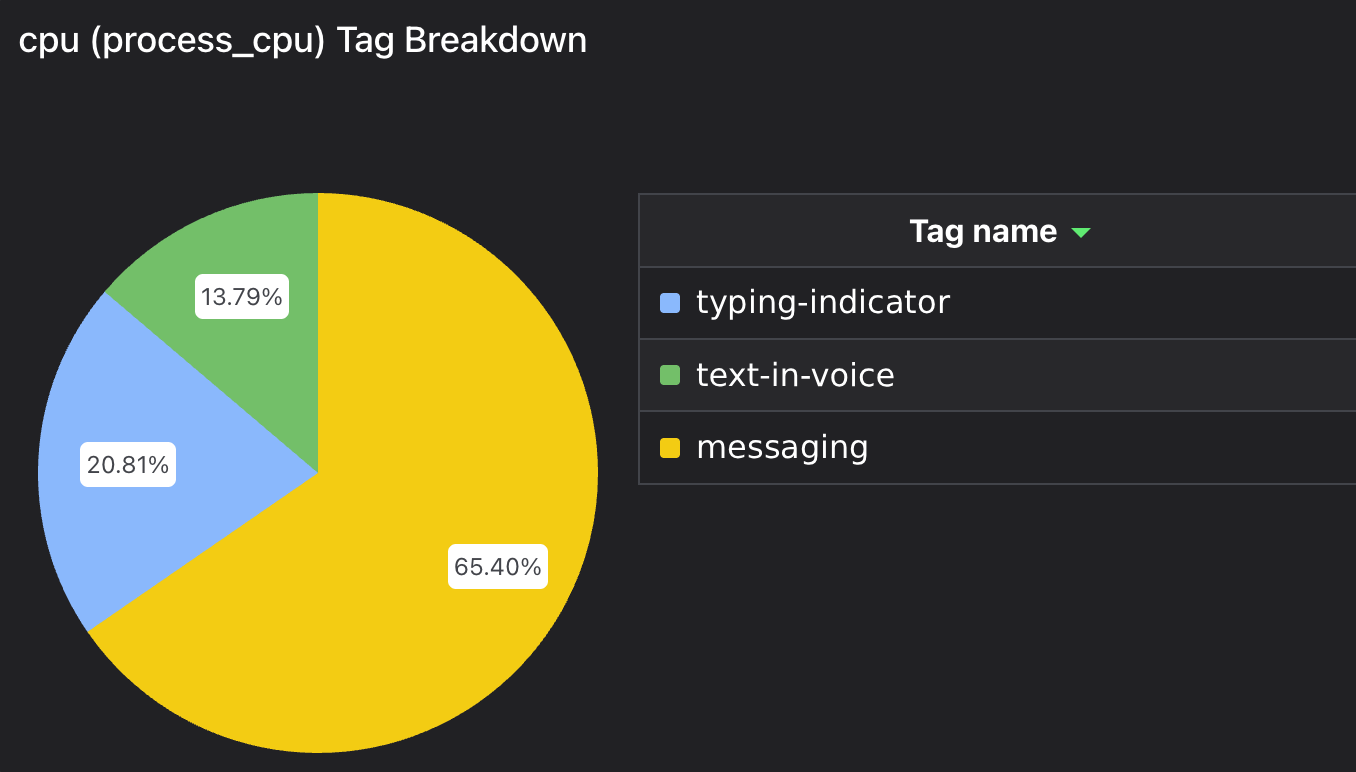
Tagging by feature and endpoint lets us aggregate total CPU time by those tags in Pyroscope! Here’s CPU time grouped by feature for an example deployment:

Pie chart showing how much CPU time was used by three feature tags.

That’s nice, but when we start talking about finances people really like using spreadsheets for this sort of thing. Now that we have everything in Pyroscope, let’s get it back out!

We wrote a script that queries Pyroscope every hour and groups by the feature labels mentioned earlier. The response includes samples broken out for each value of the specified label, which we then sum to determine a proportional weight for each feature. These weights are then used to calculate a value that indicates how much of the deployment’s total CPU time for the given hour was used running code belonging to that feature. The resulting data looks like this:

[
    {
        "start_time": "2025-06-12 15:00:00 UTC",
        "end_time": "2025-06-12 16:00:00 UTC",
        "deployment": "messages-production",
        "feature": "messaging",
        "endpoint": "create_message",
        "percentage_of_cpu": 0.28578202239694406
    },
    {
        "start_time": "2025-06-12 15:00:00 UTC",
        "end_time": "2025-06-12 16:00:00 UTC",
        "deployment": "messages-production",
        "feature": "messaging",
        "endpoint": "load_messages",
        "percentage_of_cpu": 0.539606449525691
    }
]

The resulting rows are written to our data warehouse, where they are now ready to be ingested by a data pipeline. We also write the metrics to DataDog so they can be graphed and joined with metrics in dashboards.

Putting it all together

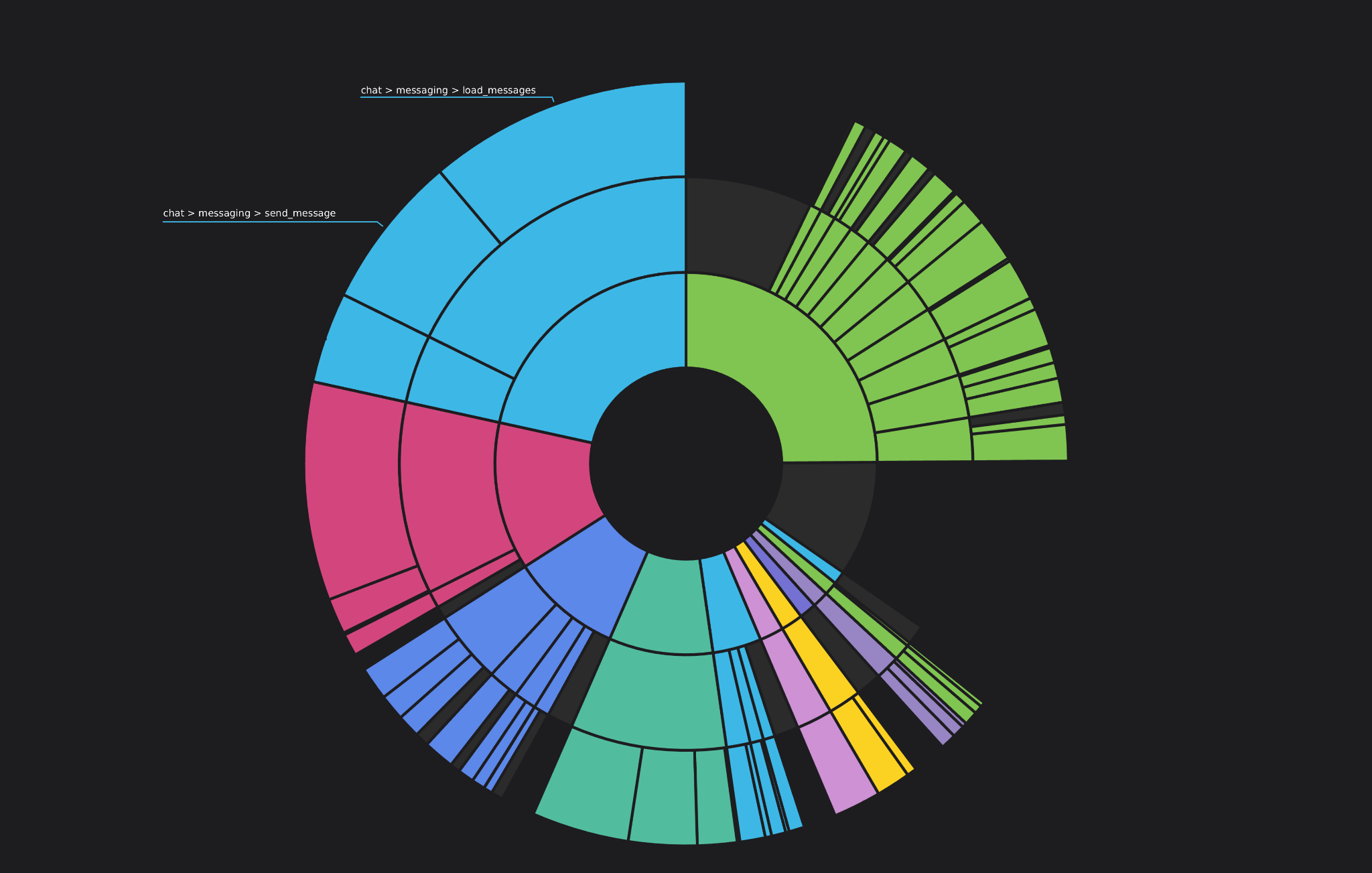
Discord already uses pipelines to aggregate and process certain data sets; to complete this project, we added a new pipeline that pulled the aforementioned billing data from our cloud provider and joined it with the profiling dataset extracted from Pyroscope. The result gives us a way to accurately see how much CPU is used by API, broken down by feature group, feature, or individual endpoint, along with the actual cost where that is appropriate.

Radial chart showing core use broken down by feature group, feature, and endpoint.
Viewing core usage by feature

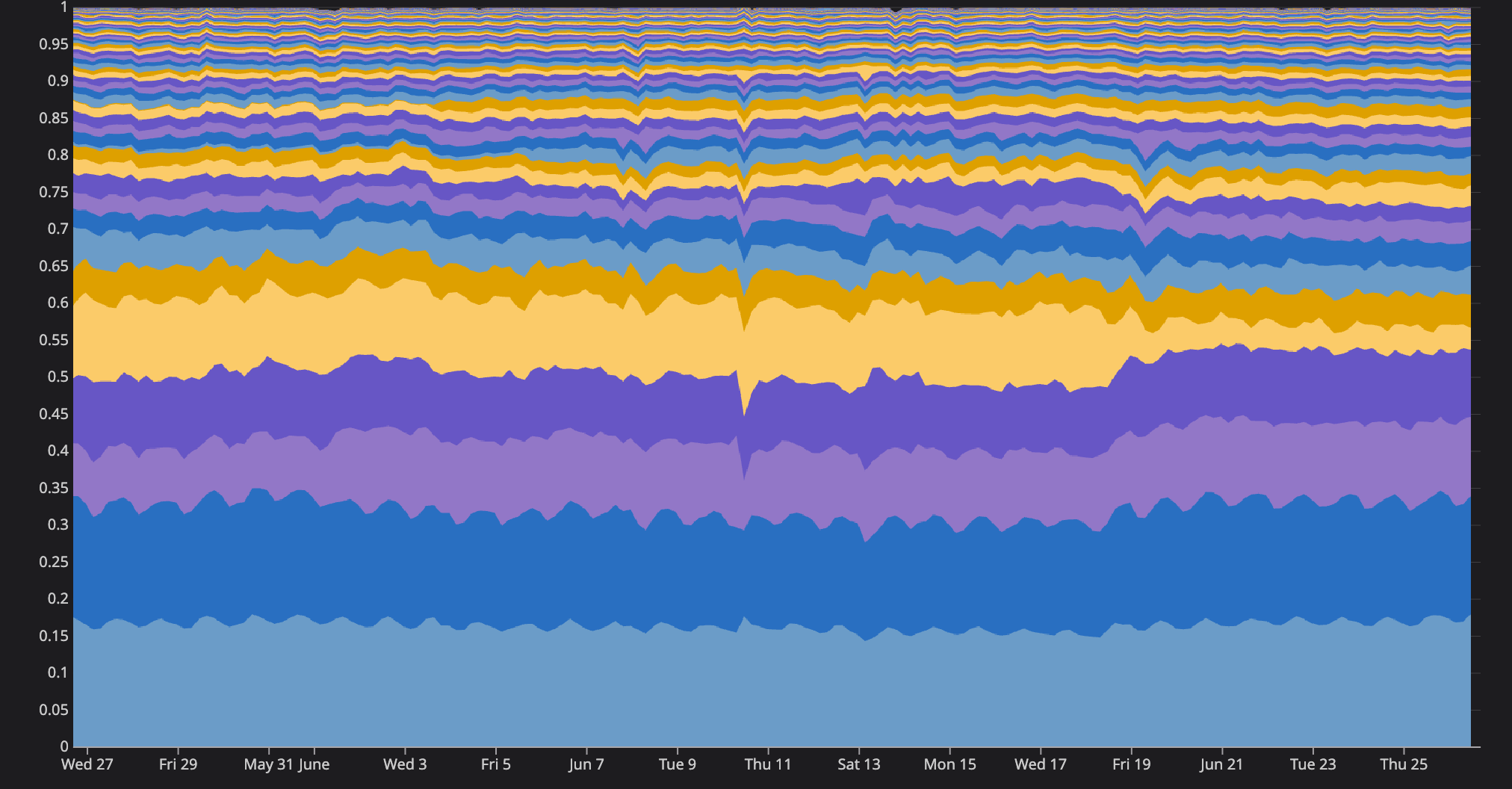
Seeing this data plotted over time also lets us keep an eye on how things are changing. When we add a new experimental endpoint or background task to API, we can better estimate the cost of scaling that feature to the rest of our users. Granting product teams more visibility into how their code runs in production allows them to make informed decisions (like when to spend time optimizing) sooner in the release cycle!

Area chart showing how CPU use for a deployment can be attributed to features, with the areas appearing and altering size over time as changes are made to the system.
Viewing CPU use over time by feature.

If you find this kind of problem interesting, the API Platform team is currently hiring! We’re looking for folks interested in working with large codebases and distributed systems to help operate the services that power Discord.

Tags
No items found.

related articles